Microvellum Training and Implementation: A Shop Guide
By Aman Pratap · · 6 min read · Software Training
Most shops buy Microvellum for the same reason: one model should give you the shop drawings, the cutlists, and the CNC code, all from a single source. Then the software arrives and the real questions show up. Who builds the library? Who trains the team? How long until the first clean job comes out the other end?
This guide covers what an implementation actually involves, how the training usually goes, and an honest look at the costs. We draft in Microvellum every day for manufacturer clients, so this is written from the production side, not the sales side.
What Microvellum actually is
Microvellum is parametric millwork software that runs on top of AutoCAD. Instead of drawing each cabinet line by line, you place products from a library, and the software generates the elevations, the cutlists, the labels, and the CNC output from the same model. Change a cabinet width once and everything downstream updates.
That is the promise, and it genuinely works. The catch is that everything depends on the library behind it. Our Microvellum shop drawings team spends more time maintaining libraries and standards than drawing lines, and that surprises most shops at the start.
Implementation is really five builds
Buying the license is the easy part. Getting to production means building five things:
- A product library that matches what your shop actually builds, not the stock samples
- Construction standards: joinery methods, reveals, tolerances
- Material and edgebanding standards with real product codes
- Report templates: cutlists, labels, and whatever your floor reads
- The CNC connection: tool files and post setup for your machines
Here is what the standards part looks like in practice. This general notes block is from one of our commercial sets. Dowel construction, 3mm PVC edgebanding on fronts, .018 on body edges, the exact drawer box build: decided once, applied to every cabinet in the job.
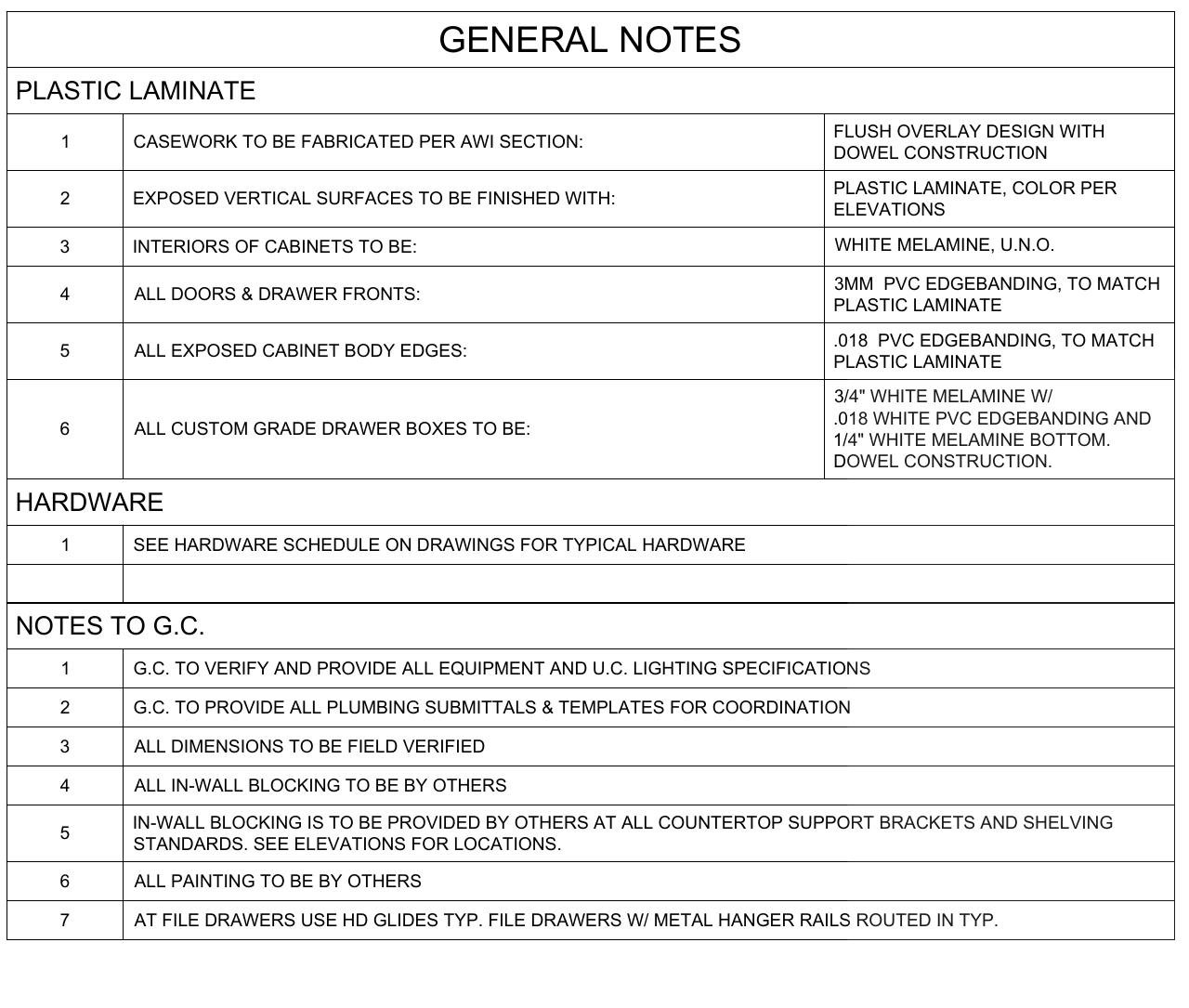
The same goes for materials and hardware. Every laminate, veneer, hinge, and pull gets a code, and each code points to a real product:
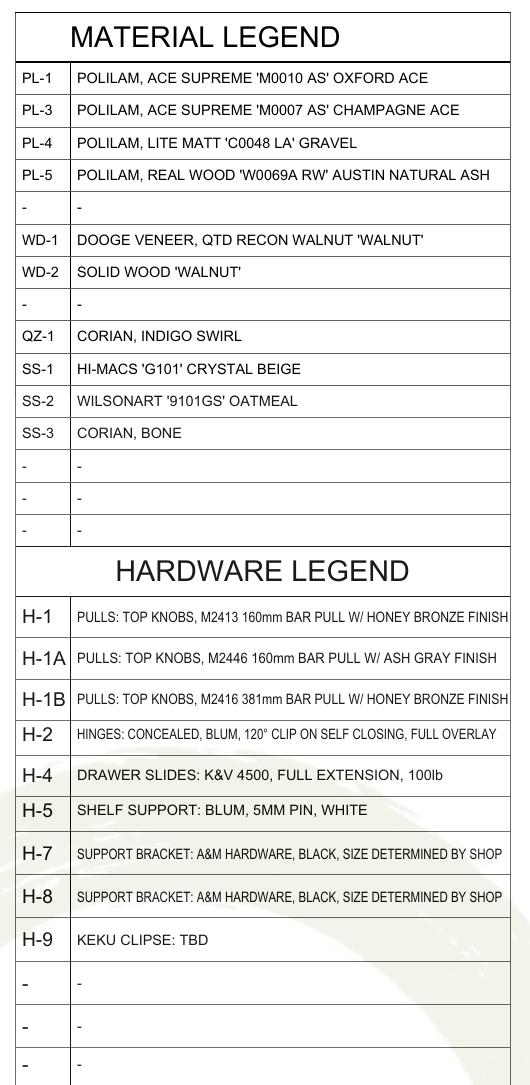
Once these exist, drawings stop being individual efforts and start being output. Until they exist, every job is a one-off fight with the software.
How the training actually goes
Microvellum's factory training teaches the tools, and it does that well. What it cannot teach is your shop: your construction methods, your materials, your machines. That part only happens on real projects.
A pattern we see over and over: drafters who train on live jobs get productive much faster than drafters who practice on sample files. The first few projects will be slower than your old process, and that is normal. The shops that struggle are the ones that expect week-one speed, get frustrated, and quietly fall back to the old workflow while the license gathers dust.
If you want a shortcut through that valley, our Microvellum training program pairs your drafters with ours on your actual projects, so the library and the habits get built at the same time.
What good output looks like
This is a residential laundry room from one of our Microvellum sets. The same model produced the plan, the elevations, this view, and the cutlists the shop built from:
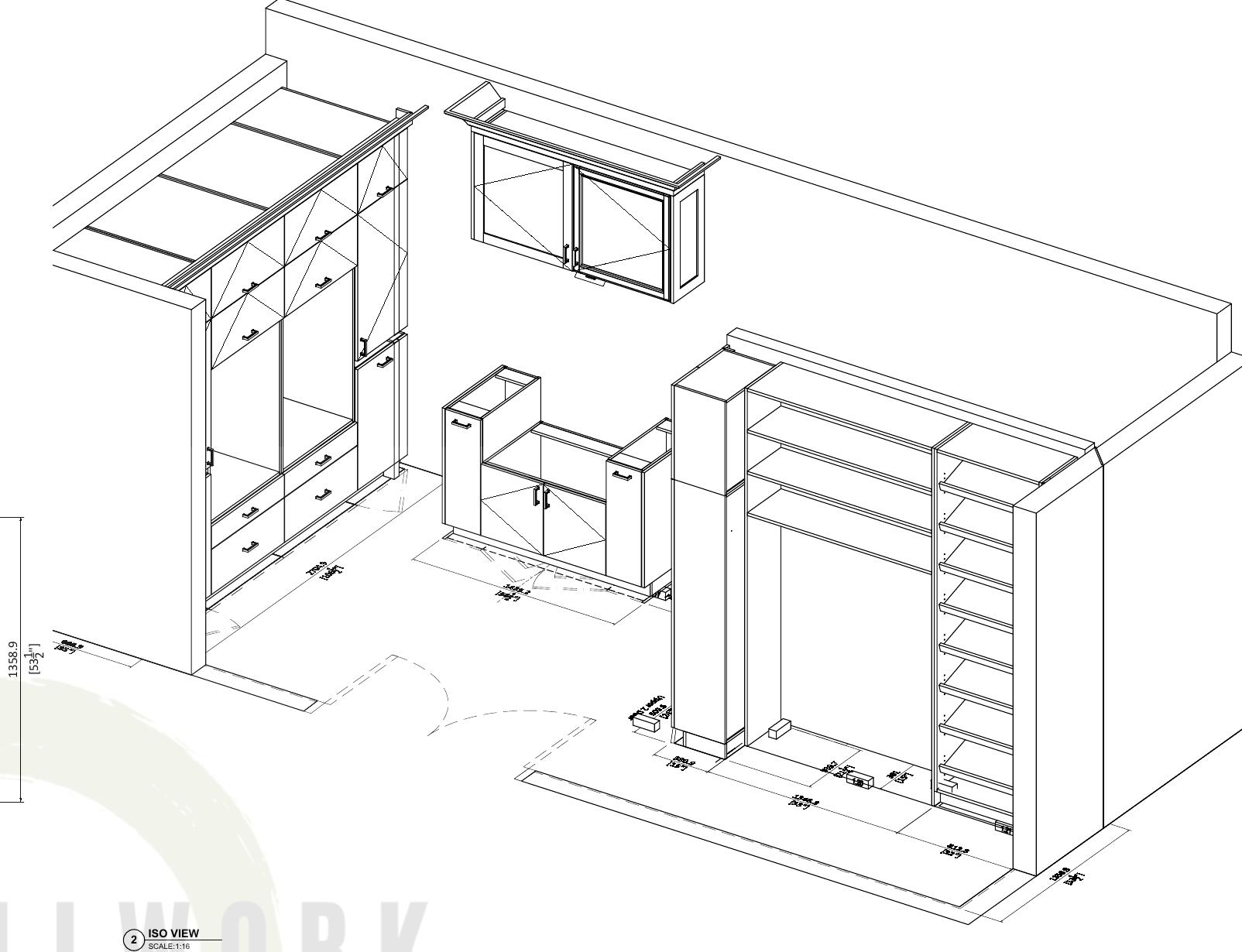
When someone asks what they are buying with a proper implementation, it is this: every view agrees with every other view, because they all come from one model.
What it costs, honestly
Microvellum does not publish prices. Licensing is quoted per shop, usually bundled with implementation and support, so budgeting starts with a sales call rather than a price page.
The bigger cost is time. A usable library takes weeks to build. The first projects run slow. A drafter in training produces less for a while. None of that is a reason to avoid the move, but it belongs in the plan. The honest budget line is not the license, it is the three months around it.
Three ways shops make it work
- Full in-house: buy, train, build the library yourself. Best when you have a senior drafter with time and patience.
- Hybrid: outsource the drawing work while your team trains on the same standards. Production never stops, and the library gets built by people who already know the software.
- Full outsource: skip the implementation entirely and buy finished Microvellum drawings per project. Best when drafting is not the business you want to be in.
Most of our manufacturer clients land on the second or third path, and we wrote an honest breakdown of the trade-offs in is Microvellum worth it.
Rolling out Microvellum, or stuck halfway? Tell us where you are and get a free consult. We will map the fastest route to clean production drawings, whether that is training your team, building your library, or drafting your backlog while you ramp up.
About the author
Aman Pratap is the Founder and CEO of A2Z Millwork Design LLC. Since founding the firm in 2020, he has grown it into a team of more than 100 drafters serving over 400 millwork manufacturers across the US, Canada, and Australia, with 500-plus projects delivered to AWI and AWMAC standards. In 2025 he was named to Woodworking Network's Wood Industry 40 Under 40 for transforming A2Z Millwork Design into a premier CAD millwork drafting partner known for precision and faster project turnaround.
FAQ's
Do I need AutoCAD to run Microvellum?
Yes. Microvellum's Toolbox runs on top of AutoCAD, so a working seat means both licenses. When you budget for the rollout, count the AutoCAD subscription alongside whatever Microvellum quotes you, plus a machine that handles 3D work comfortably.
How long does it take to get productive in Microvellum?
From our experience training drafters: the basics land in two to three weeks, and production-ready speed takes about two to three months of real projects. The single biggest accelerator is training on live jobs instead of sample files, because sample files never fight back the way a real architect's drawing set does.
Can we outsource Microvellum drawings while our team trains?
Yes, and it is the most common path we see. Library files can be shared, so an outside team can draft in your exact standards while your drafters learn on the same setup. The drawings your shop builds from do not change style halfway through the transition.
What should we prepare before implementation starts?
Gather your standards before anyone opens the software: the materials and edgebanding you actually stock, your construction methods, your hardware SKUs, your title block, and two or three past projects to rebuild as test cases. Shops that show up with these cut weeks off the library build.